KARATE CHOP

切って、伸ばして、弾く。

Slice it, stretch it, play it.

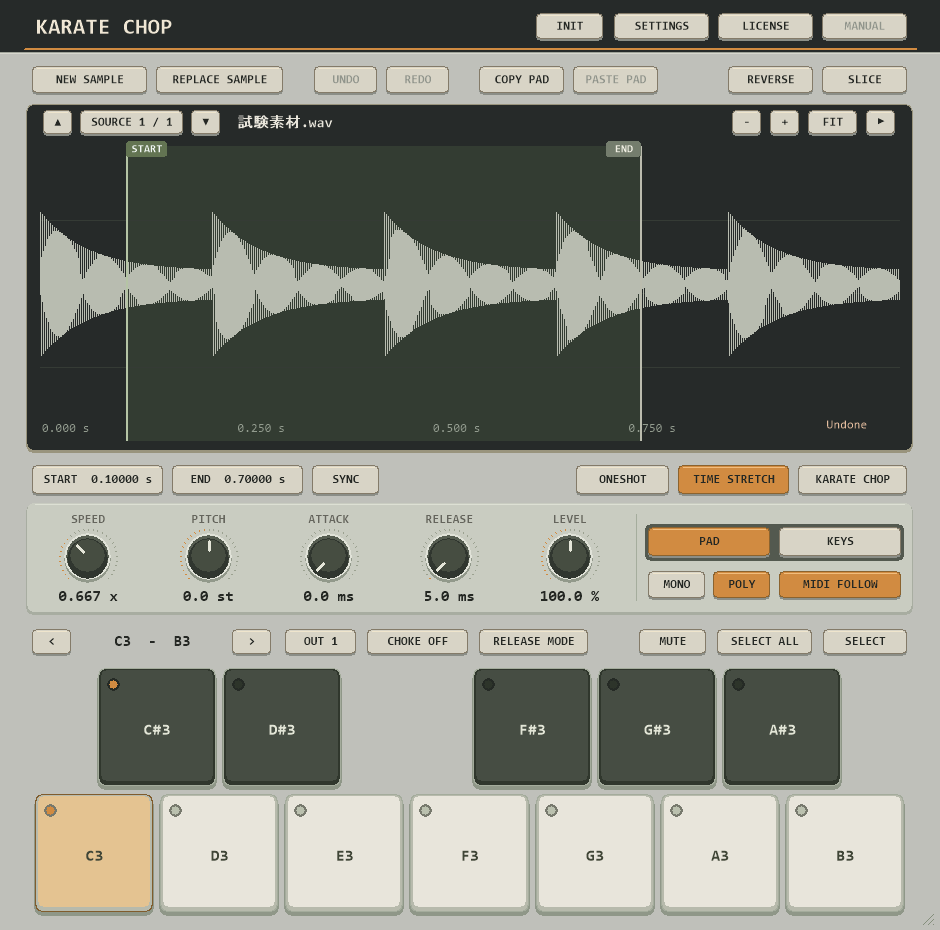
Karate Chopは、厳選されたタイムストレッチエンジンを搭載したサンプラープラグインです。
サンプルを取り込み、波形から直接スライスして、パッドや鍵盤でそのまま演奏できます。
音程を変えても長さを保つクロマチック演奏、演奏中のワンタッチ・チョップ、16系統のステレオ出力まで備えています。

Karate Chop is a sampler plug-in built around a carefully selected time-stretch engine.
Load a sample, slice it straight from the waveform, and play it on pads or keys.
It covers chromatic play that keeps duration while pitch changes, one-touch chopping while a note plays, and sixteen stereo outputs for serious mixing.

14日間の無料トライアルと購入14-day free trial and purchase

トライアルは製品版と同じプラグインで、音質や機能の制限、ノイズは一切ありません。

The trial is the same plug-in as the full version — no feature limits, no noise, no watermark.

14日間の無料トライアルFree 14-day trial

ダウンロードしてDAWに読み込み、プラグインのLICENSE画面で「START 14-DAY TRIAL」を押すだけで開始できます。アカウント登録やライセンスキーは不要です。

Download the plug-in, load it in your DAW, and press START 14-DAY TRIAL on its LICENSE panel. No account or license key is needed.

トライアル開始と有効性の確認にインターネット接続が必要です。ノイズやウォーターマークは入りません。

An internet connection is required to start and confirm the trial. No noise or watermark is added.

Windows / macOS: CLAP形式Windows / macOS: CLAP format

公開ダウンロードは準備中です。準備が整うとボタンが有効になります。Public downloads are being prepared. The buttons activate once files are published.

一括購入Buy once

1回のお支払いで永久ライセンスを取得できます。適用される税金は決済時に加算されます。Get a permanent license with one payment. Applicable taxes are added at checkout.

USD

対応環境System compatibility

Windows

OSOS
Windows 10 / 11
アーキテクチャArchitecture
64-bit
対応形式Formats
CLAP
ホストHost
CLAPに対応する64-bit DAWA 64-bit DAW supporting CLAP
メモリMemory
4 GB RAM

macOS

OSOS
macOS 10.15 以降or later
アーキテクチャArchitecture
Apple Silicon / Intel
対応形式Formats
CLAP
ホストHost
CLAPに対応する64-bit DAWA 64-bit DAW supporting CLAP
メモリMemory
4 GB RAM

ライセンスLicense

1ライセンスで2台まで同時利用できます。3台目で使う場合は、古いPCをマイページから解除できます。トライアルとライセンスの確認のため、DAWでプラグインを読み込むたびにインターネット接続が必要です。(サインイン操作は不要です。)

One license supports two active devices. To use a third device, deactivate an old one in My Account. An internet connection is required each time the plug-in is loaded in a DAW session. (No sign-in required.)

バックエンド通信にCloudflareを使用しているため、VPNを使用しない限り、中国・ロシアなど一部の国または地域ではご利用いただけない場合があります。 Because backend communications use Cloudflare, the plug-in may be unavailable in some countries or regions, including mainland China and Russia, unless a VPN is used.

よくある質問Common questions

トライアルはどう始めますか?How do I start the trial?

プラグインをDAWに読み込み、LICENSE画面の「START 14-DAY TRIAL」を押してください。アカウントもクレジットカードも不要で、全機能を14日間そのまま使えます。トライアル中の音にノイズやウォーターマークは入りません。

Load the plug-in in your DAW and press START 14-DAY TRIAL on the LICENSE panel. No account or card is required, and every feature works for 14 days with no noise or watermark.

何台のPCで使えますか?How many computers can I use?

ライセンスは同時2台までです。3台目で使う場合は、古いPCをマイページから解除できます。14日トライアルはPCごとに1回です。

A license supports two active devices. To use a third, deactivate an old one in My Account. The 14-day trial is once per computer.

常時インターネット接続は必要ですか?Do I need to stay online?

DAWでKarate Chopを読み込むたびにオンライン確認を行います。確認できない場合、新しい音は鳴りません。プロジェクトの読み書きや編集はそのまま使えます。

Karate Chop confirms authorization online each time it is loaded in a DAW session. Without it, new notes stay silent, while project load/save and editing still work.

ライセンスキーをなくした場合は?What if I lose my license key?

購入時のメールアドレスでマイページにログインすると、ライセンスキーと利用中デバイスを確認できます。

Sign in to My Account with the email used at purchase to see your license key and active devices.